
Overview
Permissions represent the smallest unit of access control in Cortx OS. A permission defines a single allowed action on a specific application, module, or entity.
Examples of actions include viewing, creating, editing, deleting, or executing operations on platform resources. Permissions by themselves do not grant access to users. They are combined into Permission Sets, which are then used to build Roles.
Steps
Permissions are system-defined and managed internally by Cortx OS. They are not created or edited directly by workspace users.
Instead, permissions become available during Permission Set Creation
Managing Permissions
Permissions are surfaced contextually when configuring Permission Sets.
Each permission maps to a specific:
Application
Module
Entity
Action
Permissions are version-controlled and consistently enforced across the platform.
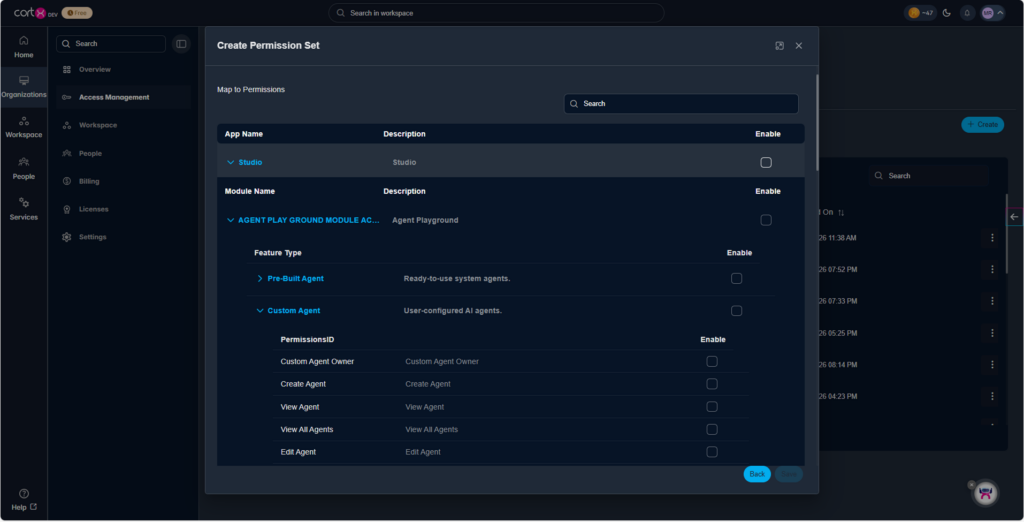
Workspace administrators manage permissions indirectly through Permission Sets and Roles rather than at the individual permission level.
Best Practices
Treat permissions as immutable building blocks.
Avoid designing access models that rely on individual permissions.
Always group permissions using Permission Sets for clarity and reuse.
Use roles and groups to control access distribution at scale.